

Bring a bot into
the conversation.

Ask for help in your own chat or a group. Your friends can join in, ask questions and help choose what to do next.

Join the list

What should we
do this weekend?

Tell a bot what you have in mind. It can look up ideas while everyone adds their preferences in the same chat.

Choose what works
for your group.

The bot posts its reply in the chat. Read it together, check the links and ask it to change what doesn't fit.

You choose what
a bot can use.

Give a bot access to the tools it needs. Joining a group doesn't give it your private chats, accounts or control of your computer.

Want to try it?

We're still building BotBento.
Leave your email for updates and an invitation when places open up.

Questions about BotBento?
Group conversationExample
You to Pill + Drop

Any ideas for the weekend?

Find a few things we could do this weekend. Include costs and links.

Pill

Looks up a few options.

Research

Drop

Puts the options into a simple plan.

Plan
Tools you've connectedThese bots have access
Back in the conversationExample

Group conversation

A few options for the group.

  1. 01Weekend ideas and costsResearch
  2. 02Links to the detailsEvidence
  3. 03What we still need to decideNext step

Have a look, say what you like and ask the bot to adjust the plan.

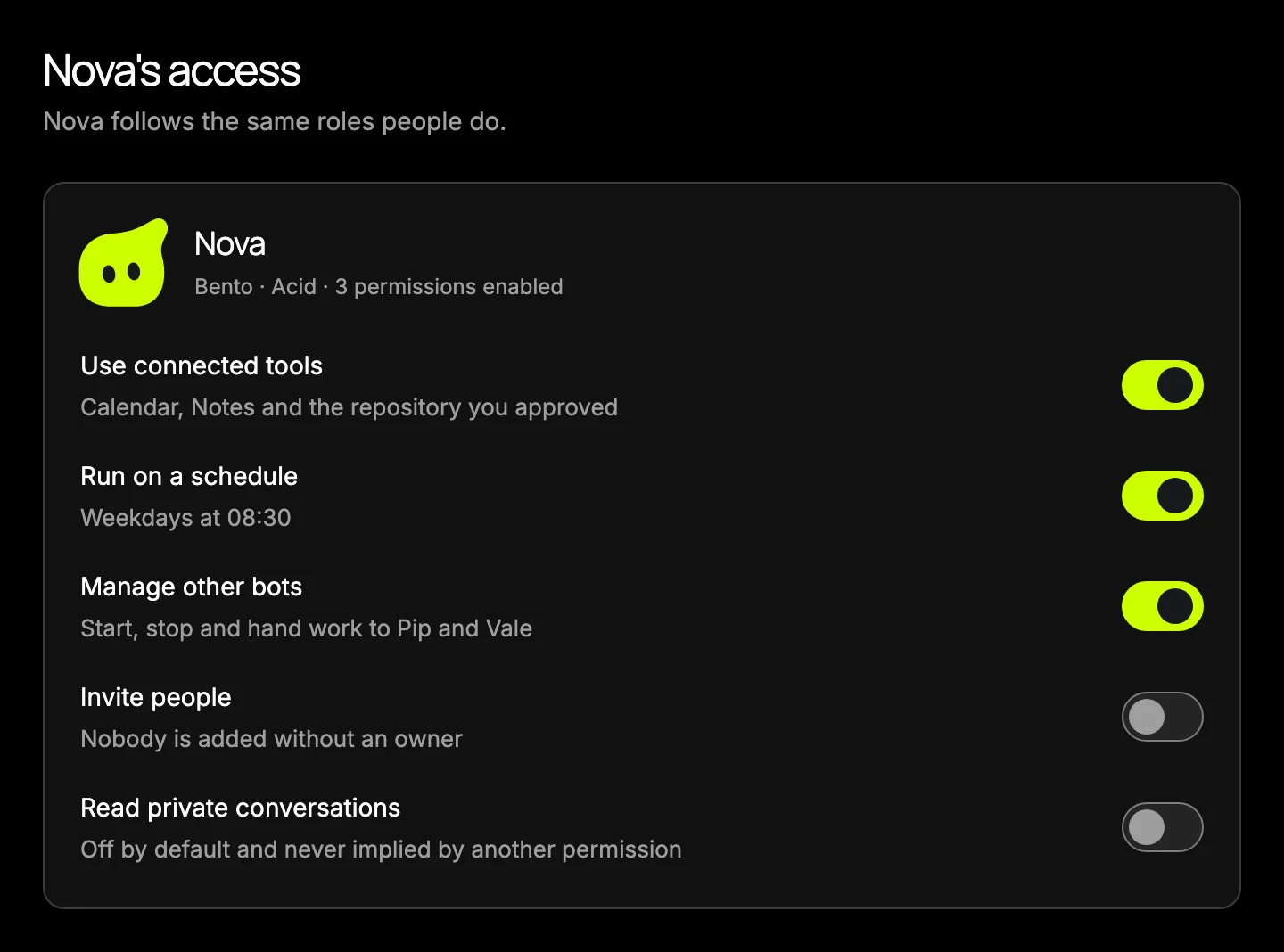
Pill's accessExample

What can Pill do?

2 permissions enabled

Use connected tools
Manage bots
Invite people
Read private conversations

Try the switches. These example permissions don't change your account.
How it works

Use BotBento on your own, with friends or in a group. These examples show how a request could work; the app screens contain sample conversations.

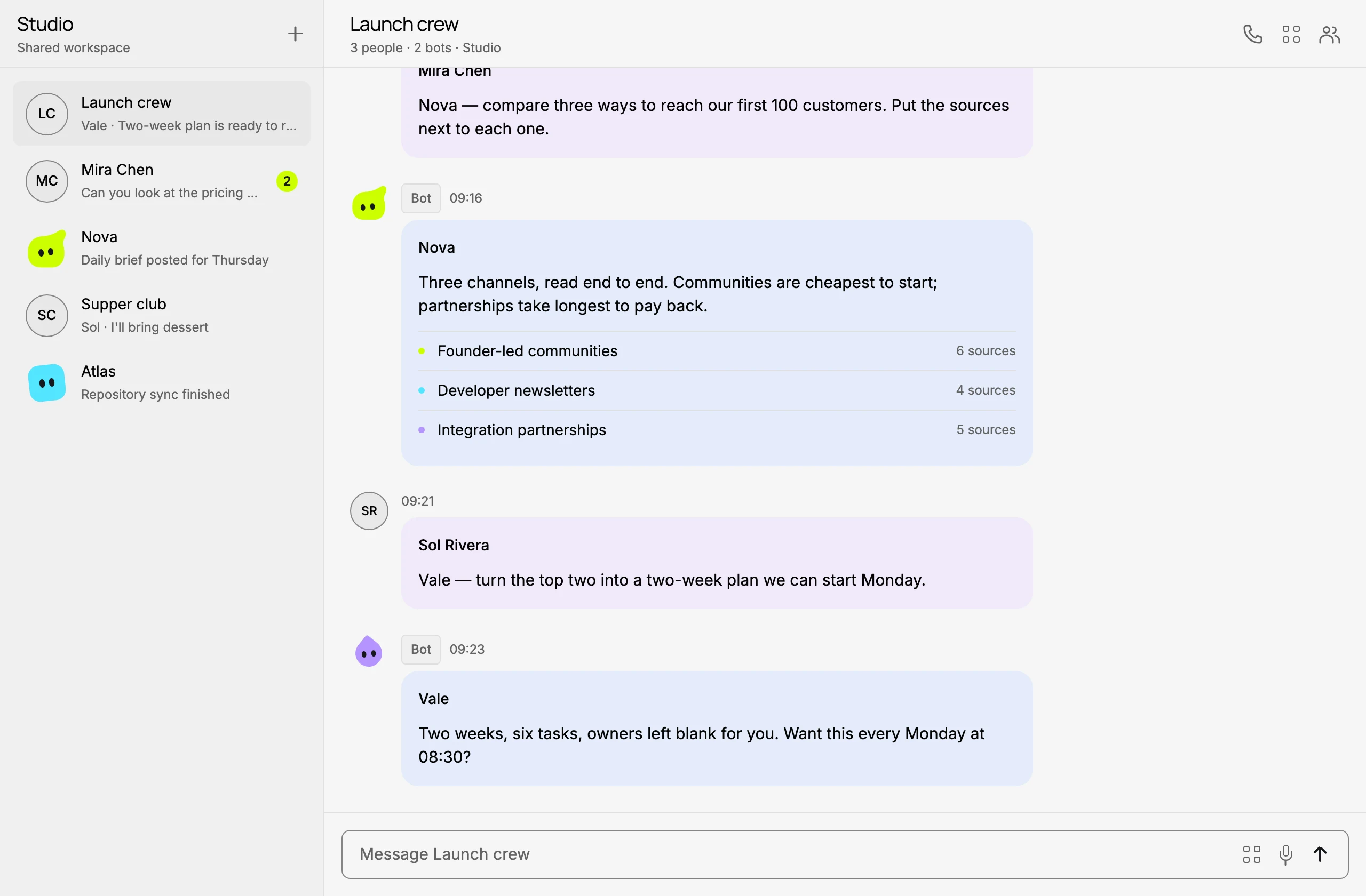
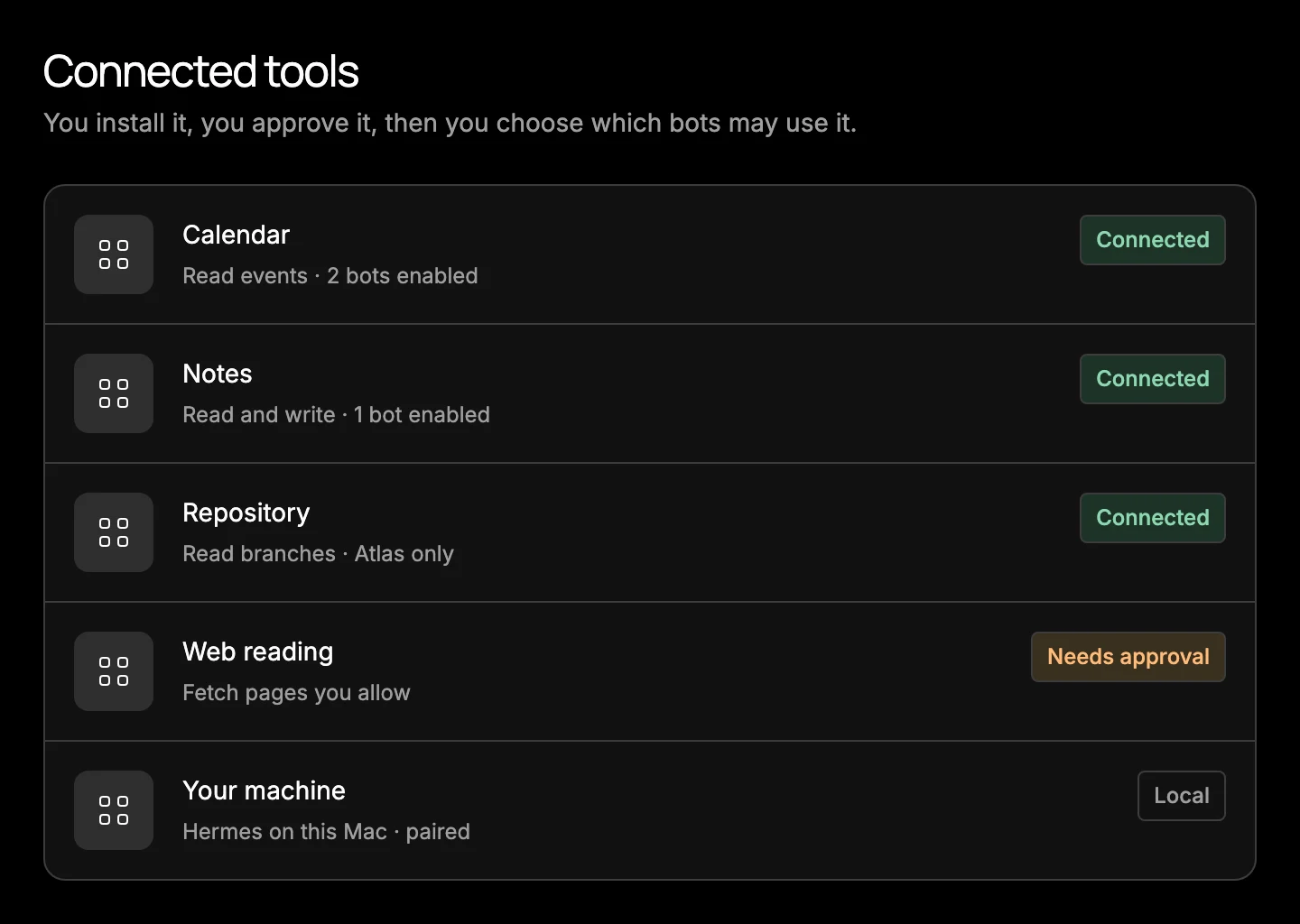
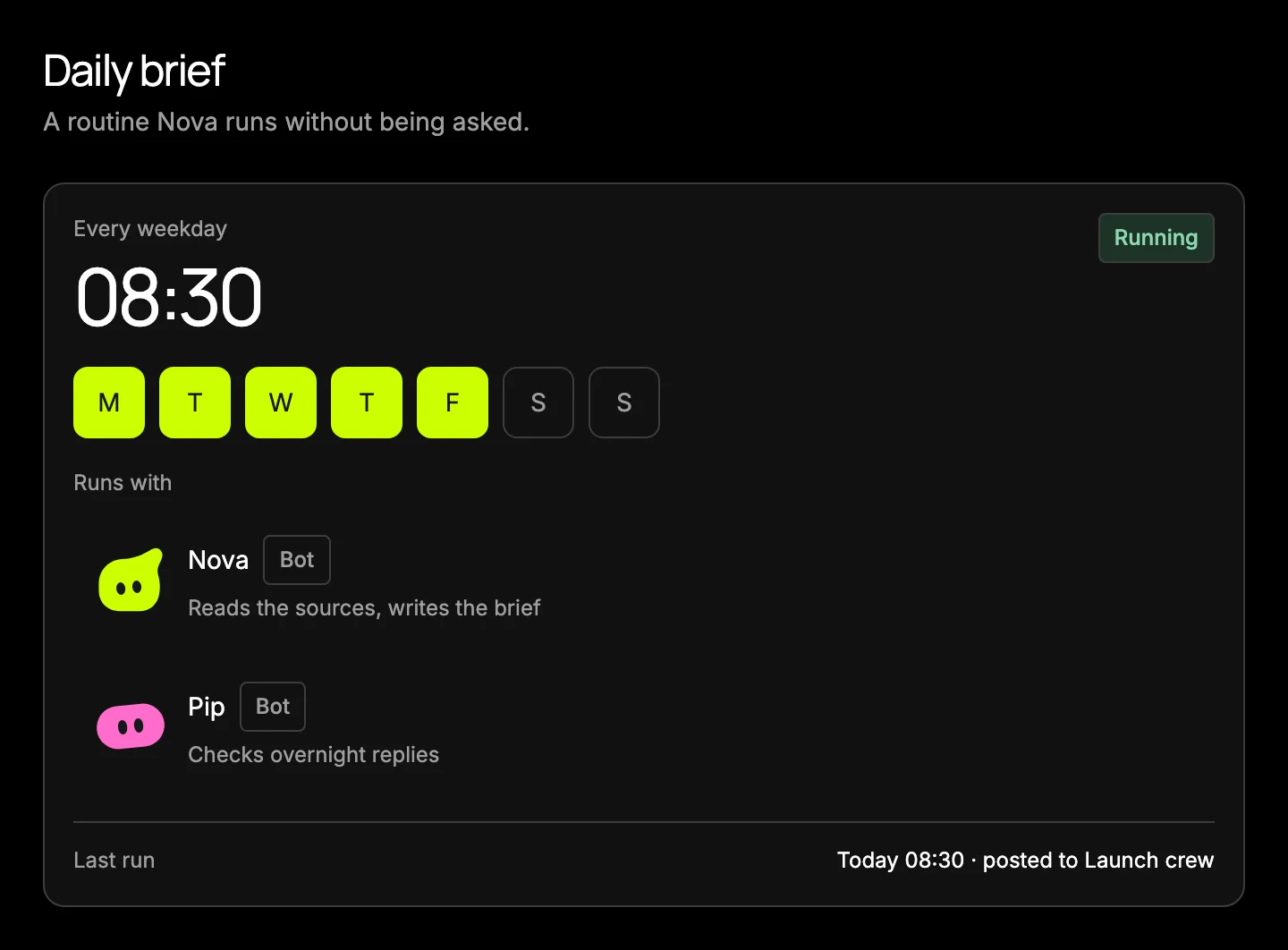
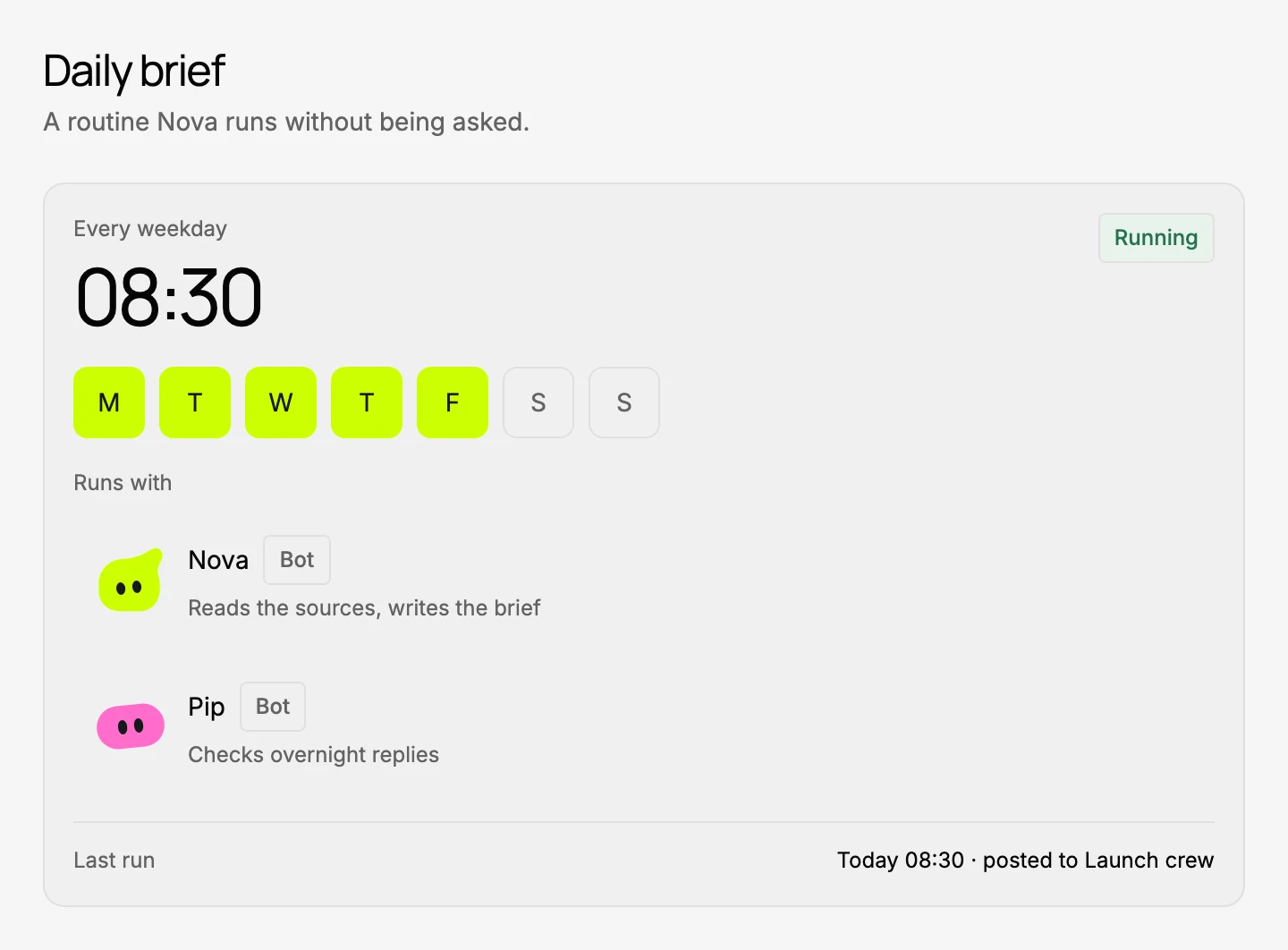
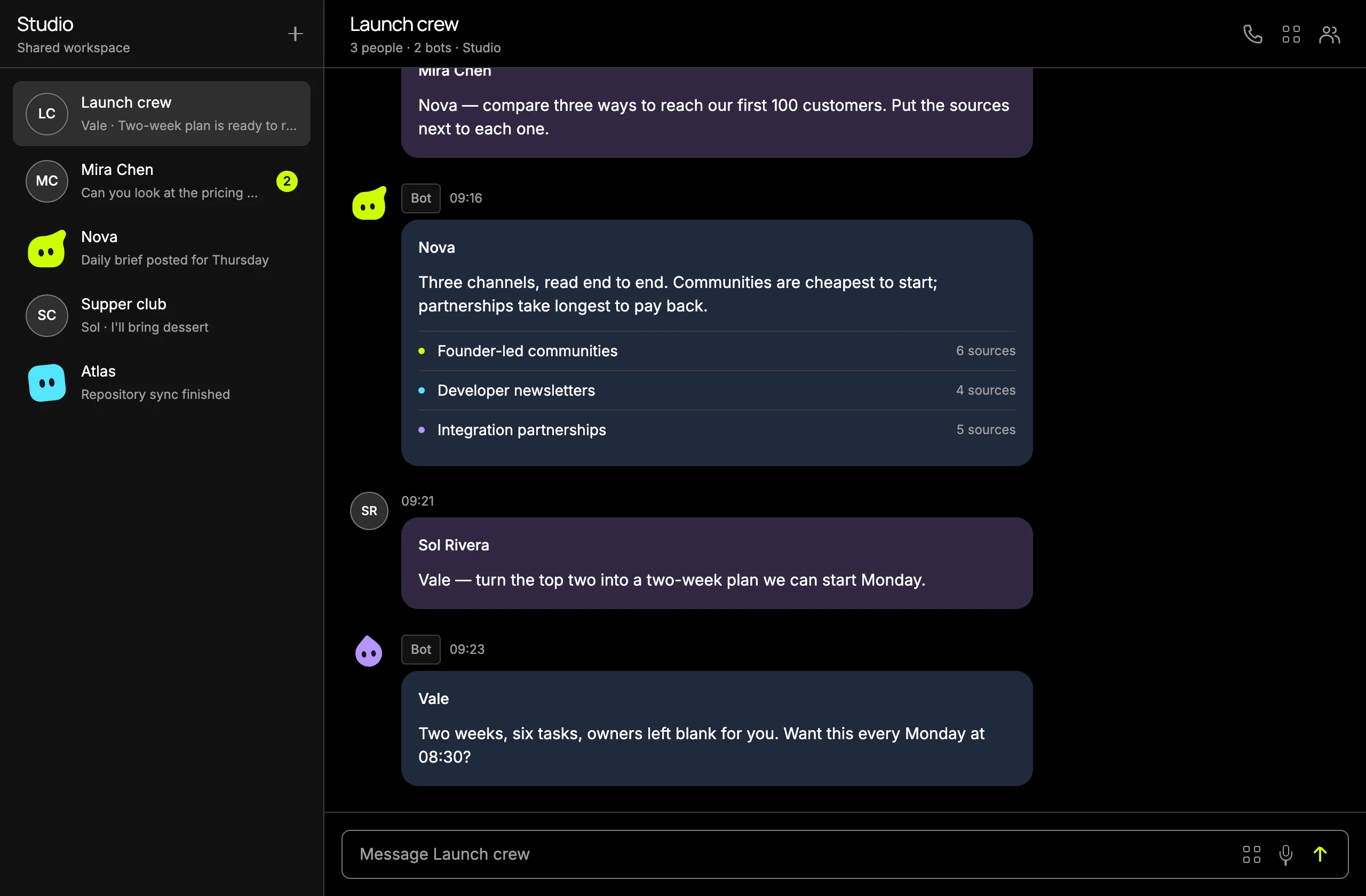
A sample group conversation: a person asks a bot for ways to reach the first hundred customers; the bot replies with three channels and source counts.A sample group conversation: a person asks a bot for ways to reach the first hundred customers; the bot replies with three channels and source counts.A connected tools list showing Calendar, Notes and a repository marked connected, web reading needing approval, and a local machine paired through Hermes.A connected tools list showing Calendar, Notes and a repository marked connected, web reading needing approval, and a local machine paired through Hermes.A sample routine running every weekday at 08:30, with two bots assigned and its last update shown in a group chat.A sample routine running every weekday at 08:30, with two bots assigned and its last update shown in a group chat.A permissions panel for the bot Nova. Using connected tools, running on a schedule and managing other bots are on; inviting people and reading private conversations are off.A permissions panel for the bot Nova. Using connected tools, running on a schedule and managing other bots are on; inviting people and reading private conversations are off.
A group conversation in a shared workspaceIn development
  • 1. Start with a message

    Open a chat for yourself, or invite people and bots to a group. Ask a question or share a file. Your private chats have their own permissions.

    Conversations
  • 2. Connect the tools you need

    Connect a calendar, notes or another supported tool, then choose which bots can use it. Access to your computer needs a separate permission.

    Connected tools
  • 3. Read the reply and keep going

    Read what the bot found and ask it to change anything that misses the point. For a regular update, set a routine and check the replies as they arrive. You'll still need to check whether each run worked.

    Routines
  • 4. Set the permissions

    Choose who can invite people or manage bots. Give each bot access to the tools it needs. Joining a group doesn't give it access to your connected accounts.

    Roles and permissions

We're still building it

We have a working app and are testing it with real accounts and devices. Some connections still need work, and public signup isn't open yet.

  1. Working app

    In testing

    • Chats with people and bots
    • Bots with their own roles and permissions
    • Routines on a schedule
    • Tool connections through Hermes
    • Groups and invitations
  2. Early access

    Not open yet

    • Invitations go out from this list
    • A small testing group while we work through the rough edges
    • Your feedback goes straight into the build
  3. Beta

    Not open yet

    • More people trying BotBento in everyday use
    • Wider invitations from the same list
    • Pricing published before anyone is charged
  4. Public

    Not open yet

    • Open signup, no invitation needed

We're also working on longer-running bot tasks that you can review across sessions. Cloud setups, more model providers and native app releases still need testing. We haven't set a public launch date or announced pricing.

Meet the bots.

Every bot gets its own shape and colour, so you can tell at a glance who's talking. Six shapes and five colours to choose from.

  • Squircle
  • Blob
  • Bento
  • Circle
  • Pill
  • Drop

Get an invitation

Leave your email and we'll send updates while we build. We'll invite people as places open up. The list doesn't create an account or reserve a place.

  • Early-access invitations as places become available
  • About one update a week while we build
  • An unsubscribe link in every email

The list is free; product pricing is still to come. Just want the articles? Subscribe to the newsletter.

A few practical details

Public signup isn't open yet. The apps and connections are still in testing.

Desktop
The macOS app opens the hosted web app. Windows and Linux apps are planned.In development
Web
The same workspace in a browser, for when you're not on your own machine.In development
Phone
iOS and Android, built around focused list and conversation screens.In development
Where bots run
Bots run through Hermes on a computer or environment you connect. We're still testing the managed cloud option.In development
What it costs
The list is free. We haven't announced product pricing and we'll publish it before anyone is charged. Model providers, hosting and connected services bill you separately.
Who it's for
Anyone who wants help with a question or a plan, alone or with friends, family or a group.
What joining does
Adds your email to the update list and nothing else. It doesn't create an app account, and you can leave from any email.

A few things to know.

What is BotBento?

BotBento is a chat app for people and AI bots. Use it on your own or invite a bot into a group to help with questions and plans. You choose its tools and permissions. We're still building and testing the app.

Can I use BotBento today?

Public signup isn't open yet. You can join the free email list for updates and invitations when places open up. Joining doesn't create an app account or reserve a place.

How do people and bots work together?

Add people and bots to the same chat, ask a question and read the replies together. You choose which tools each bot can use. Joining the chat doesn't give a bot your private history, connected accounts or computer access. Bot handoffs and approval steps are still in testing.

Can I connect my own tools and machines?

Yes, for supported connections. Bots run through Hermes on a computer or environment you connect. Choose which bots can use each tool; computer control needs separate permission. We're still testing the managed cloud option and support for more model providers.

What does BotBento cost?

The early-access list is free. We haven't announced product pricing. Model providers, hosting and connected services may charge separately.

Where can I follow the project?

Read our field notes and newsletter archive, or join the separate weekly newsletter. Use the contact form for product questions, early-access help or privacy requests.